

In SEO Product Management, few things gain as much trust with Product & Engineering teams as creating great SEO tickets.
That’s because the quality of tickets makes a HUGE difference in how efficiently work is planned and completed — not to mention the success of the outcome. They aren’t just about documenting tasks, they bridge the gap between SEO strategy and technical execution.
All of that is to say, the ability of SEO PMs to collaborate effectively with developers largely hinges on the ability to write, submit, and manage tickets.
So let’s get into how to do it well, including SEO ticket examples you can adjust to your organization’s standard system and format.
Why is writing good tickets so important?
Much like a puzzle box, engineering tickets standardize how requests are packaged, so developers can more easily gauge difficulty, understand requirements, see the goal, and compare projects.
Submitting a poorly-written SEO ticket is like asking someone if they want to do a puzzle, then giving them some of the pieces and no reference photo on the box. They’re going to have questions, it’s going to take much longer, and more than likely, they’re going to do another puzzle instead.
A well-structured, clear, and comprehensive SEO ticket gives developers a complete puzzle box. It catalyzes efficiency, communicates the larger goal, and shares the pieces — all in packaging that’s universally understood. This allows developers to use their tools and talents to fit the pieces together correctly and create the intended big-picture.

Great tickets streamline the development cycle by eliminating the need for back-and-forth to get the full context. Clarity up front can save everyone considerable time and effort later.
Common types of SEO tickets
Different types of work have different end goals, whether it’s to create something, fix something, or learn something.
Each of these three buckets are representative of a different type of ticket. Depending on the org, there might be multiple ticket types within each bucket.
As an SEO Product Manager, part of your job is to understand the type of ticket that you’re submitting. While something might feel “broken” as an SEO, it could be a new feature from a developer's perspective.
For example, if some content is only served in JavaScript, and that’s hurting organic performance, it probably feels like an SEO bug. But to a developer, serving that content in a more SEO-friendly way is a new feature. Nothing is broken.
In general, every org uses different ticket types for new work, fixing existing work, and research. However, the name could vary: a “story” at one business might be called a “feature request” at another — or a “defect” could be called a “bug” ticket.
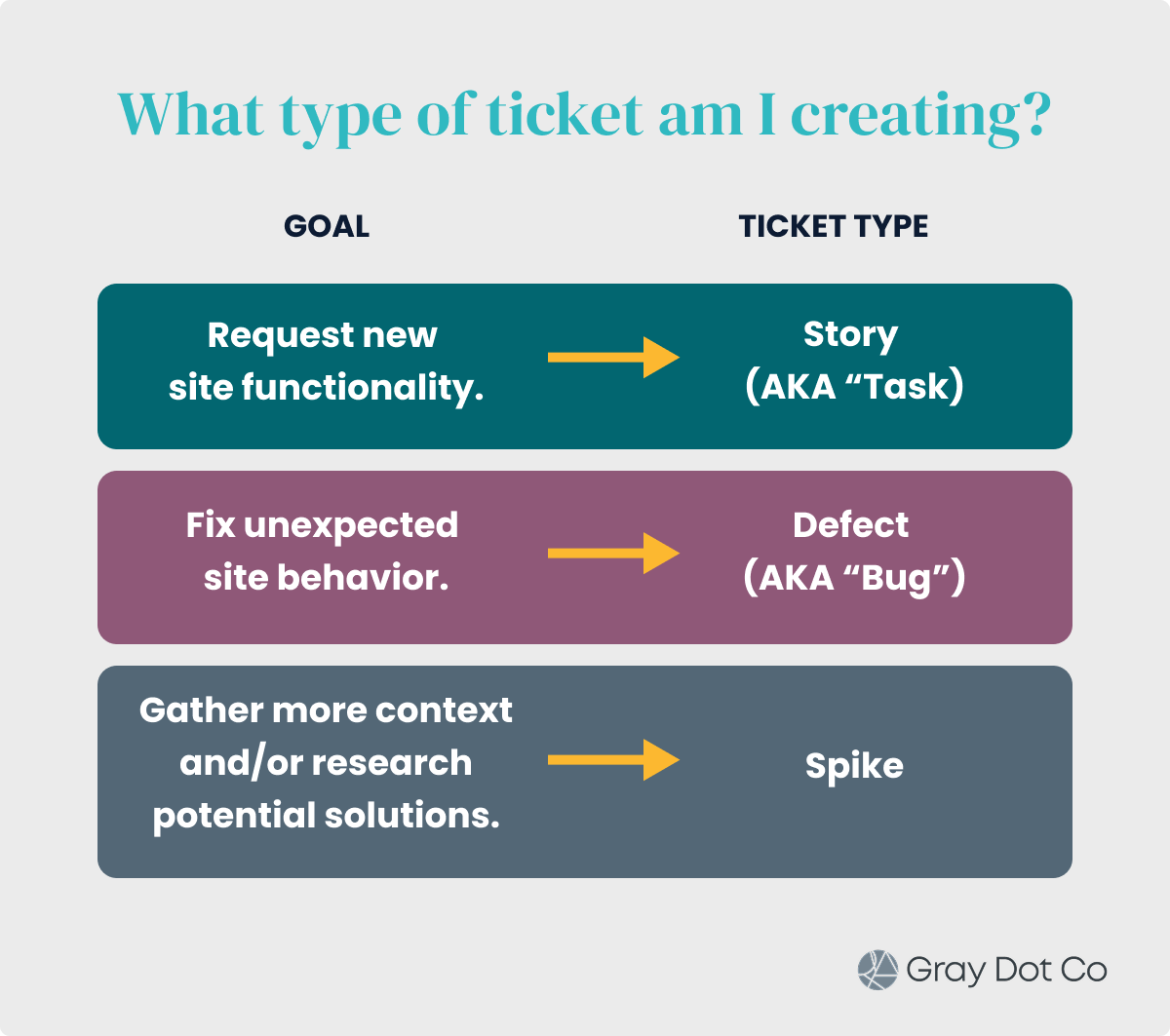
Story & task tickets are for new features.
A story ticket is meant to “tell the story” of what the user wants.
In the most commonly used format, tickets tell that story by including two main components, each of which we’ll talk more about later:
- User Story: “As an X user, I want Y so that Z.”
- Acceptance Criteria: “Given X, when Y, then Z.”
Given the nature of SEO story tickets, they will generally have more technical detail than a typical story from customer support or product teams. SEO considerations are specialized knowledge (which is why we have jobs!), so SEO PMs can’t assume that developers know the inner workings of SEO.
It’s worth noting that some orgs treat “story” and “task” tickets as interchangeable terms. Whereas at other businesses, they’re used as separate pieces in the engineering workflow. When they’re different, a task is generally a smaller, more direct (know exactly what to do, do the thing) ticket.
See it in action: View our story ticket example.
Defect tickets are for fixes.
“Bugs” and “defects” generally refer to the same type of ticket, where the goal is to address existing issues that are negatively impacting SEO performance and/or the user experience.
For example, you might submit a bug ticket if you suddenly find a number of broken redirects that were previously working.
In the rare case that an org makes a distinction between bugs and defects, a bug is usually a function not working properly. Whereas, a defect can include any function or feature that doesn't meet requirements or work as expected.
The key information in a bug ticket includes:
- A clearly identified problem
- The impact of fixing or not fixing the issue (what kind of impact, on whom, and how much)
- Steps to reproduce or validate the issue
See it in action: View our defect ticket example.
Spike tickets are for research and context.
Some problems require research or investigation before it’s possible to outline a definitive solution. This is where spike tickets come in.
An SEO spike might be something like, document the dynamic sitemap structure for this multi-subdomain website.
Spikes are time-boxed and result in knowledge or proposals for future story tickets, rather than resulting in any direct code changes.
Epics connect related tickets.
You can’t capture bigger projects that have many moving parts and milestones in a single story.
An epic groups multiple, related stories or tasks into a large body of work. Or in some cases, it connects tickets as part of a larger theme they share. Either way, it provides a high-level view and helps with strategic planning.
SEO PMs might create an epic like, Implement Core Web Vitals Improvements.
When creating any epics, work with relevant Product Managers and Business Analysts to make sure you’re using them the way the rest of the team does.
What are the components of a good SEO ticket?
SEO tickets typically use a standardized framework for each ticket type. This ensures that requests are communicated clearly, completely, and consistently.
The same key components are included in every ticket, because they’re crucial to setting context and facilitating efficient work.
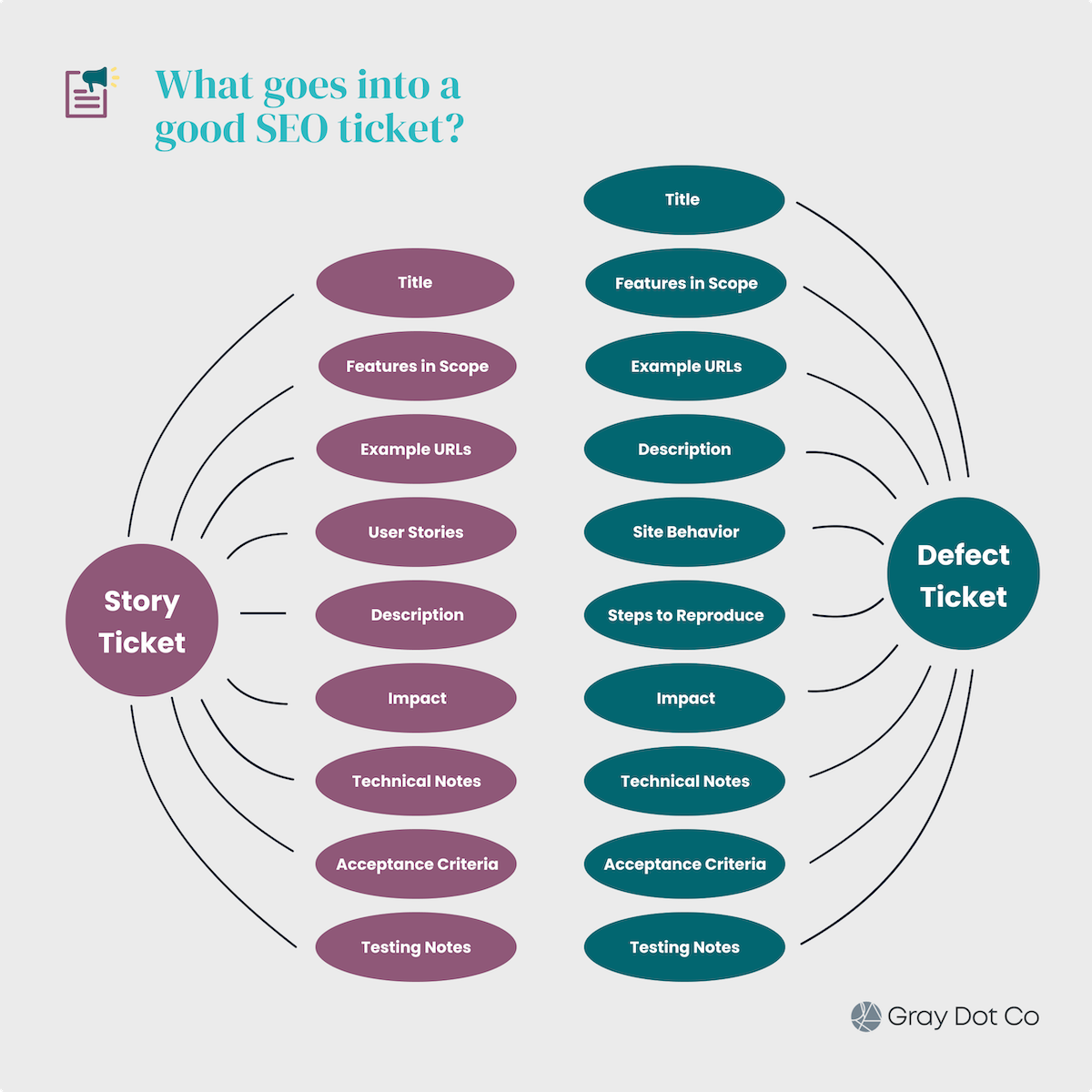
As we breakdown each of those components, we’ll follow an example story ticket, so you can see how it all comes together.
Clear title
Clearly and immediately communicate the purpose of the ticket, while being as concise as possible. If the team uses any naming conventions across tickets, it’s important to follow them.
- Good Title: SEO - Implement Schema.org Product Structured Data on Product Detail Pages
- Poor Title: Schema for products
What it looks like in our example story
SEO - Add a Customizable H1 on Blog Category Pages
Features in scope
What functionality or feature(s) of the site are affected by this request, whether it needs to be fixed (bug ticket) or will be new to the site (story)?
What it looks like in our example story
Blog category pages and listings
Example URLs
What are examples of URLs on the site that will be affected by this work? In the event that the work affects multiple page templates on the site, be sure to include an example from each template.
What it looks like in our example story
- https://www.example.com/blog/category
- Including all sub-paths with listings
Elaborative description
Next up is the description, which should elaborate upon the title. Provide context as to why the work is important by describing the problem or opportunity being addressed.
Using a structured format like bullet points can help make the description easier to digest for the dev team.
In a story ticket, the description should mention how users, including search engine crawlers, are impacted by the work.
In a defect ticket, the description should define the current (broken) behavior on the site, as well as the desired behavior after the fix.
What it looks like in our example story
- Currently on blog category pages, the H1 is just the category name and is not customizable.
- For SEO optimization, a site admin would like to be able to customize the H1 to be more user- and SEO-friendly.
What it looks like in a defect ticket
Our site serves internal links using onclick events. However, search engines are only able to crawl HTML links that are served in an <a href> tag.
Our current link format is preventing search engines from discovering internal links, because spans, onclick events, and custom web components will not register as links.
This inhibits search engines’ abilities to discover and index pages on the site, as well as pass search equity between pages.
User stories (story tickets only)
User stories generally follow the format: "As a [type of user], I want [some goal] so that [some benefit]." This inclusion helps better understand the purpose of the work, which makes prioritization easier to assess.
SEO story tickets should outline user stories from three distinct perspectives as applicable.
- Search crawlbot: What is the value of the work for the search engine (crawler) from a technical perspective?
- Frontend user: How does a human user benefit from potential changes on the SERP or within the site experience?
- Admin (internal) user: What’s the value of any functionality made available for an internal stakeholder?
What it looks like in our example story
Searchbot
As a search engine bot crawling category pages of the blog section of example.com,
I want each category page to have a single, descriptive H1,
so that I can better understand where this page is relevant in search results.
Frontend user
As a visitor to a category page on example.com’s blog,
I want to immediately see a headline that indicates the main topic of the page,
So that I understand what the subject of the articles listed on the page is.
Admin user
As an admin of the blog section of example.com,
I want to have a single field to enter a custom H1 for each blog category,
so that I can include an SEO-optimized headline on each category page.
Site behavior (bug tickets only)
Site behavior is short and sweet, usually consisting of two main bullet points..
- Actual behavior: What is the current behavior on the site that merits fixing?
- Desired behavior: What is the expected site behavior after a fix is implemented?
What it looks like in a defect ticket
- Actual behavior: Product Schema error for product pricing format.
- The current product pricing included in the schema markup is the product’s “original price” value and not the current “sale price” value.
- The price displayed in search results is not the actual price the consumer will see once landing on the product page.
- Desired behavior: When “sale price” is enabled for a product, include this price in the schema markup rather than the product’s original price.
Steps to reproduce (bug tickets only)
For bug tickets, be sure to include detailed steps to reproduce the current behavior this ticket should fix. That means outlining every click and interaction that produces the incorrect behavior.
What it looks like in a defect ticket
- Open any browser and navigate to https://www.example.com/locations/all.
- Right click/double click and select inspect.
- Open all the sections, as needed, to see the tag slot and shadow root details.
Impact
How will you measure the success of this ticket's implementation? Define clear success metrics by specifying the KPIs you'll use to gauge impact and monitor performance (e.g. click, impressions, avg. SERP position).
These KPIs should align with your business’ measurement plan to show how the work fits in with broader business goals.
What it looks like in our example story
We expect to see a 20% increase in organic traffic to blog category pages with a custom H1 within three months of launch.
Technical notes
Detail the “what” from a technical perspective, outlining the specific changes, implementations, or fixes required.
- Be precise: For example, if you're asking for a meta tag, specify the exact tag name, attribute, and potential dynamic values.
- Provide examples: Such as mockups and examples from competitors that clearly show the desired results.
- Include visuals: If you're requesting a change you can see on the page - such as a new UI element - provide wireframes, mock-ups, and/or annotated screenshots.
- Link resources: Link to Google documentation or other technical documentation about the issue.
- Connect the dots: Are there related tickets or previous work to sections of the site that give greater context and provide opportunity for consolidating work?
What it looks like in our example story
- Competitor example: https://www.competitor.com/blog/category
- Google documentation: https://developers.google.com/style/headings
- Link(s) to related tickets: EN-4703
- Screenshots/mockups:

Acceptance criteria
Acceptance Criteria are quantifiable, testable conditions that the work has to meet for the ticket to be considered complete. It’s how SEOs, PMs, QA testers, and any developers working on the ticket will know that the implementation checks all the boxes.
What it looks like in our example story
- The admin has a field for each blog category to add a customizable H1.
- The page HTML has only one H1.
- The H1 appears in the body of the page before other page-specific content (especially any other heading tags).
- The H1 style will not change with this task.
- If no custom H1 is entered, the H1 will default to the category name.
- When a custom H1 is entered, it will replace the category name as the H1.
- If a query string parameter is added after the URL for the category, the custom H1 will stay intact.
Testing notes
Include testing notes that will enable anyone who’s not an SEO to test that the goal of the work has been accomplished.
Your notes should describe scenarios to test beyond the obvious, defining various ways the work could impact how users interact with this section of the site.
Also include any tools or relevant SEO knowledge that would benefit developers and QA — like tools and considerations for testing in different environments. Example: We can’t test robots.txt changes in staging because it has disallow logic to block crawling on the staging site, and this logic must stay intact.
What it looks like in our example story
- The H1 should be visible in the response HTML when you “view source” for the blog category page.
- The H1 can be confirmed when crawling the page with Screaming Frog or using the URL Inspection Tool in Google Search Console.
Best practices for writing SEO tickets
As you craft a ticket and its respective components, here’s what you need to consider as an SEO PM.
Adopt internal language.
Every org labels and manages tickets a bit differently, like differences in ticket-type naming. Teams at different businesses will adopt their own internal language for virtually every stage and element of the development process, from ticket creation to QA. Use the same terminology in your tickets, so everyone is speaking the same language.
Be specific.
Your goal is to eliminate guesswork and assumptions, leaving no room for interpretation. That means avoiding vague language like, Improve page speed.
Be specific to create clarity, like the examples below:
- Remove secondary (render-blocking) call to hero image on article template
- Minify CSS files X and Y on homepage template are better examples.

56.7% of SEO PMs are not present in dev standups when an SEO ticket is in the pipeline.
Align with the SEO roadmap and business cases.
The ticket is the last piece of documentation you create before development. Any ticket that’s created - especially story and spike tickets - will reflect the broader goals and buckets laid out in the SEO roadmap.
Meanwhile, elements like impact, prioritization, and urgency should show continuity with relevant SEO business cases that have been created for important bodies of work.
Focus on the "what" vs. the “how."
When you’re submitting a ticket to development, you’re telling the chef what you want to eat — not how to make it. An SEO PM’s role is to define the desired outcome, as opposed to detailing how it should be coded. That’s a big reason why competitive examples and solution mockups are so handy.
Empower developers to leverage their expertise, enabling them to come up with the best solution that meets the technical requirements and acceptance criteria.
Standardize templates and checklists.
Standardization is a huge piece of development efficiency. That starts with ticket creation: the more consistent tickets are in their components, language, and formatting, the easier it is for dev collaborators to take them and run with them.
Creating reusable templates for the most common SEO ticket types will help you save time, while streamlining execution on the development side. Your templates might include the key components of the ticket, checklists of common acceptance criteria, validation tools, and more.
Collaborate early on with developers.
Proactive collaboration prevents rework and ensures alignment from the outset. Don't write tickets in isolation — engage with your development lead or a relevant developer as you create them. Discuss the requirements, potential challenges, and technical feasibility.
Managing tickets through the development lifecycle
The development lifecycle can look a little different from one business to the next.
Some teams may have Business Analysts, Project Managers, Delivery Leads, and/or Solutions Architects who contribute before a ticket reaches prioritization planning. Once the ticket is submitted, it may pass through multiple hands for detail-building, estimation, prioritization, and testing instructions.
As an SEO PM, you should be well-versed in the lifecycle and frameworks within it. While things may look a little different at each stage, tickets usually follow this process:
- Ticket submission →
- Ticket grooming →
- Picked up in sprint planning →
- Development during sprint →
- Pre-launch quality assurance and user acceptance testing →
- Post-launch QA →
- Post-launch tracking & documentation
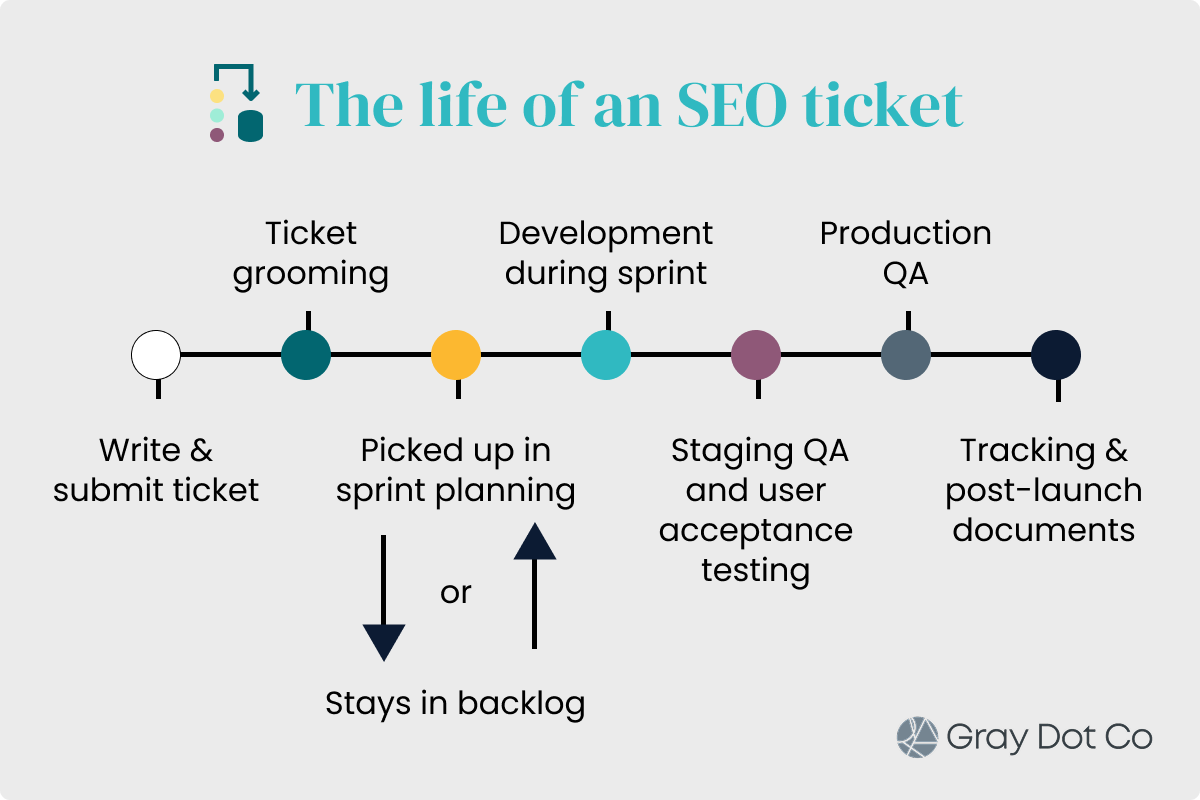
Pre-launch elements
Submitting & updating tickets in management platforms
SEO PMs should know how to create, track, and update tickets in the platform(s) that everyone on the dev team uses. The most popular platforms are generally Jira, Asana, and Trello.
Sprint planning
Most development teams work in Agile sprints that typically last one to two weeks. During sprint planning, the team estimates the amount of time/resources to complete work. Coupling that with priority, the team slots in work for the upcoming sprint, ensuring that they don’t commit to more work than there is available time/resources in the sprint.
SEO PMs should actively participate in sprint planning to clarify any questions, especially when there are SEO tickets in the docket. Unfortunately, nearly one out of every two SEO teams don’t have a representative in sprint planning meetings.
Story points
The time and resources available across the dev team for any given sprint is generally represented by “story points.” The time and resources estimated to complete a ticket is also represented in story points.
This helps the team quantify how much work they can commit to in a given sprint. If a ticket has too many points to fit into a sprint, it might get broken down into smaller tickets.
As an SEO PM, you should know what the story point estimation means in terms of how much work your ticket is for the team.
Iterative feedback
This iterative feedback loop is crucial for successful outcomes, so expect questions! Developers will often seek clarification or propose alternative solutions as they work through tickets. Be responsive, open to discussion, and ready to provide additional details.
User acceptance testing (or SEO QA)
Once a ticket is "done" in development, it moves to QA before launch to production. As the SEO specialist, you are responsible for performing SEO QA. Verify that all acceptance criteria are met, test the functionality, and ensure the SEO implementation is correct.
Use tools like Google Search Console, Screaming Frog, or browser extensions to validate. Document any issues you discover and create new bug tickets as necessary.
Post-launch elements
Release notes
Share release notes to Inform relevant stakeholders (marketing, product, leadership) about the SEO changes that went live.
Release notes are an exercise in translating technical changes into business value in terms the broader team can understand. Explain what was implemented, why it's important, and what the business should expect in terms of benefits and/or impact.
For example: We added functionality to give blog category pages custom H1 tags, which will help these pages rank more competitively for high-value terms and drive more traffic to the site.
Knowledge base articles
What did the team learn that would be valuable context for future team members and initiatives? For significant SEO implementations, create a knowledge base article that documents the technical details, rationale, and ongoing maintenance considerations. It should capture the background, decisions, out-of-scope items, and critical history.
Tracking & reporting
You've guided the work, now demonstrate its value by setting up analytics and reporting dashboards to track key performance indicators (KPIs) associated with the ticket. This demonstrates the ROI of SEO work and provides data-driven insights for future initiatives.

64.7% of SEO PMs don't use release notes.
We surveyed SEOs, PMs, and marketing leaders to benchmark SEO product management implementation and sophistication across brands.
Start with a proven template.
As you craft and fine-tune templates for different SEO tickets, there’s no need to start from scratch. Start with the same templates we use for a head start on writing tickets that win the dev team’s hearts.
Remember: Every team has its own nuances when it comes to tickets, so tweak the templates to align with internal language and expectations!


